Chicken Shoot: Official InOut Games Arcade Shooter
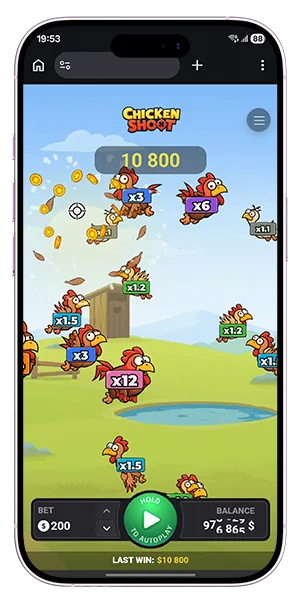
Chicken Shoot is a fast-paced arcade shooting game from InOut Games that combines simple controls with dynamic multipliers and instant results. Each round is built around a single shot, where you select a target, fire, and immediately see the outcome based on the multiplier attached to that target. The structure is direct and action-focused, making it easy to move from one round to the next without delay.
Chicken Shoot game mechanics are designed around precision and timing rather than long sessions or complex rules. You control every shot manually or switch to continuous firing using the SPIN button, while different chicken types move across the screen with multipliers ranging from x1.1 up to x120. With defined bet limits, fast rounds, and a clear win-or-lose outcome per shot, Chicken Shoot online delivers a format that keeps gameplay focused, responsive, and easy to follow from the first round.
Chicken Shoot Game Overview
Fast rounds, direct control, and visible risk levels define the core of the game from the very first shot. Chicken Shoot keeps the action focused on target selection, shot timing, and multiplier potential, so each round feels immediate and easy to follow without slowing the pace with unnecessary steps.
What makes Chicken Shoot different
The game stands out through its one-shot structure and moving targets with different values. Instead of building a long chain of actions inside one round, Chicken Shoot resolves every attempt through a single shot, which creates a very fast rhythm and makes each decision matter.
Key features include:
- 1 round = 1 shot
- manual target selection by tapping
- continuous shooting by holding SPIN
- multiple chicken types with different multipliers
- increasing values after repeated failed shots on the same target
This setup gives the game a clear arcade identity and keeps the action readable even when several targets are moving across the screen at once.
InOut Games and the arcade shooter format
InOut Games uses a format that combines quick interaction with a strong visual response. The result is a shooting game where every round begins with a stake, continues with a target choice, and ends instantly in a win or a loss depending on whether the selected chicken explodes.
That structure keeps the gameplay compact and makes it easy to understand what is happening in each round:
- Set your bet
- Select a target
- Fire your shot
- Get the result instantly
RTP, bet limits, max win, and multipliers
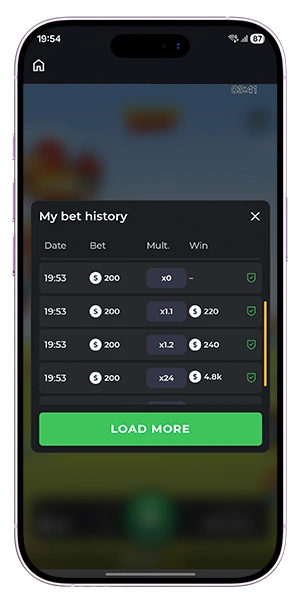
The technical profile gives a clear picture of how the game is built. Chicken Shoot works with a 94% RTP, bet sizes from $0.01 to $200, and a maximum win of up to $20,000. Multipliers start from x1.1 and can progress up to x120, giving the target field a broad range of possible outcomes.
| Game factor | Value |
| RTP | 94% |
| Bet range | $0.01–$200 |
| Max win | up to $20,000 |
| Multiplier range | x1.1–x120 |
These values make it easier to understand how the game balances fast action, flexible staking, and high-variance target selection.
How Chicken Shoot Works
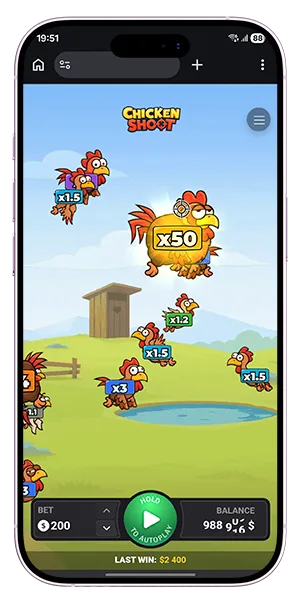
Every round in Chicken Shoot is built around a single action: choose a target, fire, and get the result immediately. That simple structure keeps the pace fast while still giving each decision real weight, because the outcome depends on the chicken you target and whether the shot destroys it. The official rules also make the round logic very clear: 1 round = 1 shot.
One round equals one shot
The game starts with your stake. Before the round begins, you choose the amount you want to bet, then select a chicken on the screen and fire. If the target is destroyed, the round ends with a payout based on that chicken’s multiplier. If the target survives, the round ends as a loss and the winnings for that shot are cancelled.
The round sequence is straightforward:
- Set the bet amount.
- Choose a chicken.
- Fire one shot.
- Get an instant win or loss result.
Manual targeting and SPIN button play
Manual mode gives you direct control over which chicken to attack. You tap a target on the screen and that tap triggers one shot. The game also supports a faster input method through the SPIN button, which can fire at a random target automatically. Holding the button activates continuous shooting mode and keeps the action running as long as the control is held.
Winning, losing, and multiplier growth
Target value is one of the most important parts of the game. Chickens appear with different multipliers, and harder targets can offer much higher returns. When you fail to destroy the same target several times in a row, its multiplier increases by a fixed increment. That value only resets after the chicken is finally destroyed.
| Round outcome | What happens |
| Win | The chicken explodes instantly and the bet is multiplied by its coefficient |
| Loss | The chicken is hit but not destroyed, so the round pays nothing |
| Repeated misses on same target | The target’s multiplier keeps increasing |
| Target destroyed | The multiplier resets to its base value |
This design gives the game a strong rhythm: fast single-shot rounds, visible target values, and rising tension when missed chickens keep becoming more valuable.
Chicken Types, Multipliers, and Risk Levels
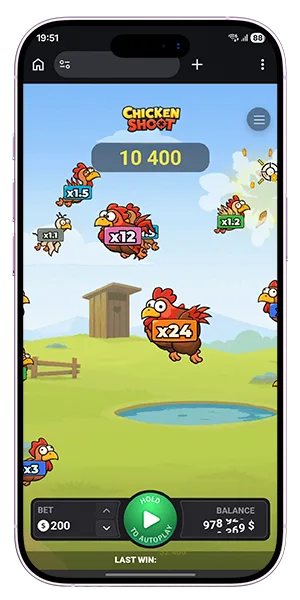
The core of Chicken Shoot is built around different target types, each carrying its own multiplier and level of risk. As chickens move across the screen, you decide whether to aim for lower, more stable values or higher multipliers that carry greater uncertainty. This balance between risk and reward defines how each round plays out.
Multiplier range from x1.1 to x120
Each chicken type is assigned a multiplier that determines the potential return if the shot is successful. Lower-value targets appear more frequently and offer smaller payouts, while higher multipliers are harder to hit and come with increased volatility.
| Chicken type | Multiplier range | Risk level |
| Basic targets | x1.1 – x2 | Low |
| Mid-value targets | x2 – x10 | Medium |
| High-value targets | x10 – x48 | High |
| Rare targets | x48 – x120 | Very high |
This range gives you full control over how aggressive or conservative each round should be, depending on the targets you choose.
Progressive value increase after failed shots
When the same target is selected multiple times without being destroyed, its multiplier increases with each failed attempt. This creates a dynamic situation where a previously low-value target can become more attractive over time.
Key mechanics of multiplier growth:
- each failed shot adds a fixed increment to the multiplier
- the increase continues as long as the target survives
- the value becomes more attractive with each miss
Reset after destruction
Once a chicken is destroyed, its multiplier returns to its base value. This reset ensures that each target starts again from its original level and prevents values from increasing indefinitely.
This system adds a strategic layer to the game: you can follow a target across multiple rounds, allowing its value to grow, or switch to a different one depending on movement and risk preference.

Auto Game and Mobile Play
Chicken Shoot is built for both quick manual rounds and longer sessions with automated settings. This gives you two different ways to approach the same game: direct shot-by-shot control or a continuous sequence that keeps firing according to your chosen setup.
Continuous shooting mode
Manual play lets you react to targets one by one, but the game also includes a faster option for players who want to keep the action moving. Holding the SPIN button activates continuous shooting, and shots continue for as long as the control is pressed. This makes it easier to stay in the flow of the game when you want a faster pace.
Auto settings from 10 to 1000 rounds
Auto Game expands this further by letting you define a longer shooting sequence in advance. You can choose the number of auto rounds from 10 to 1000, and the game will continue until the selected amount is completed or stopped manually.
The Auto Game setup includes:
- a selected number of auto rounds
- manual choice of target types
- continuous play until the sequence ends
- the option to stop the run at any time
This structure gives you more control over session length and target preference without changing the core one-shot round format.
Playing on desktop and mobile browsers
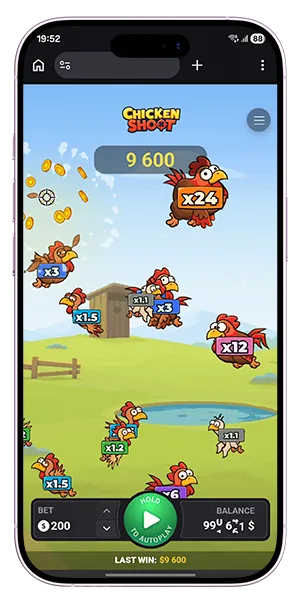
The game works well across desktop and mobile browsers, which makes it easy to switch between devices while keeping the same mechanics and pace. Tapping chickens on a touch screen feels natural in manual mode, while the SPIN control and auto settings remain easy to use on smaller displays.
That combination of manual play, automated rounds, and cross-device access makes Chicken Shoot flexible without changing the simplicity of the core gameplay.
Why Players Choose Chicken Shoot
The game stands out because it keeps everything focused on speed, control, and clear outcomes. Each round is short, every action has a direct result, and the structure makes it easy to understand what is happening at any moment. This combination creates a format that feels active rather than passive, with constant decisions between safer targets and higher multipliers.
Fast rounds and instant action
Every shot produces an immediate result, which keeps the gameplay moving without delays. There are no extended sequences inside a round, so you always return quickly to the next decision point and stay engaged throughout the session.
Provably Fair system
The game uses a Provably Fair system, which allows each result to be verified independently. This gives you a transparent framework where outcomes are determined through a clear and consistent process rather than hidden mechanics.
Demo and real-money access
Chicken Shoot can be played in both demo mode and real-money mode, with the same mechanics in each version. Demo access lets you test targeting, multipliers, and auto settings without risk, while real-money play applies the same structure with actual stakes.
Key reasons players choose the game:
- simple one-shot round system
- direct control over target selection
- wide multiplier range up to x120
- visible progression of target values
- flexible play through manual and auto modes
This combination of clarity, speed, and control makes the game easy to approach while still leaving room for different play styles and risk levels.
FAQ
What is Chicken Shoot?
Chicken Shoot is an arcade shooter from InOut Games where each round is based on one shot. You place a bet, pick a target, fire, and get an instant result based on that chicken’s multiplier.
How does Chicken Shoot work?
The round flow is simple: set your stake, choose a chicken, shoot, and see whether the target explodes. A successful shot pays your bet multiplied by the target’s coefficient, while an unsuccessful shot ends the round without a payout.
What multipliers are available in Chicken Shoot?
The game uses chicken targets with multipliers starting from x1.1 and going up to x120. If the same target survives repeated shots, its multiplier increases until that chicken is finally destroyed, after which it resets to its base value.
Does Chicken Shoot have auto play?
Yes. You can hold the SPIN button for continuous shooting or use Auto Game settings to run a defined number of rounds. The official game information states that auto play can be configured for up to 1000 shots, with target preferences also available.
What are the RTP, bet limits, and max win in Chicken Shoot?
Chicken Shoot lists an RTP of 94%, a bet range from $0.01 to $200, and a maximum win of up to $20,000. These values give the game a clear technical profile and make it easier to understand its pace and risk structure.
Can I play Chicken Shoot on mobile?
Yes. The official site states that the interface is optimized for mobile play, with touch controls for manual targeting and responsive performance across screen sizes.